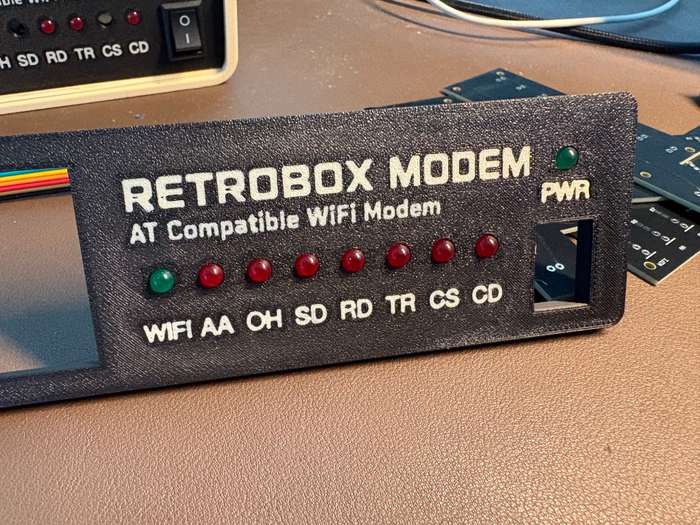
The LED PCB is finally here
This was one of those parts I had been waiting for for quite a while. The dedicated PCB for the RetroBox Modem front-panel LEDs has finally arrived from PCBWay, although getting a small board with a handful of LEDs through customs turned out to be considerably more complicated than expected.
The electronics themselves were not the difficult part. The delay came after shipping, with customs turning what should have been a very ordinary package into another small development problem to solve.
Once it arrived, I could finally stop looking at the LED board as a drawing and start checking it against the real front panel, the Raspberry Pi and the firmware.
Why make a PCB for a few lights?
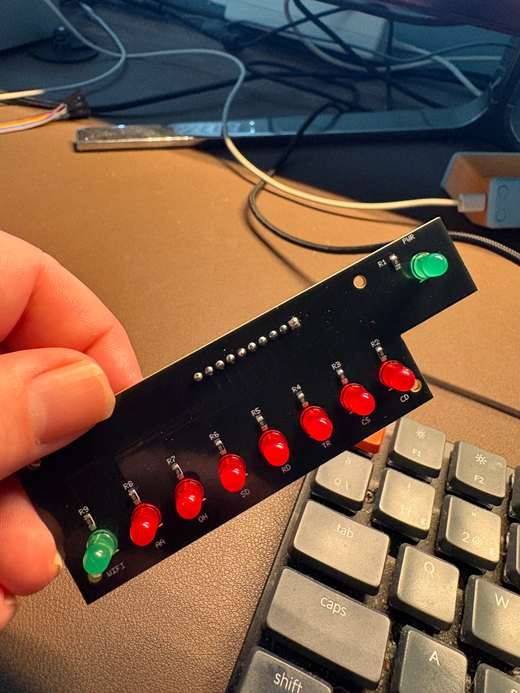
During the first prototypes it was possible to wire individual LEDs directly and keep moving. That is useful while proving an idea, but it becomes much less practical when the enclosure, front panel and electronics have to line up repeatedly.
The new board puts the indicators, their resistors and the connection header in one fixed mechanical piece. PWR remains separate at the upper right of the panel, while the main row carries WIFI, AA, OH, SD, RD, TR, CS and CD.
That makes the front panel much easier to assemble and, just as importantly, means that every new prototype starts from the same physical LED positions instead of another set of hand-positioned wires.
From the connector to the Raspberry Pi
The LED PCB does not contain another microcontroller. It is deliberately simple. A header and wiring harness connect it to the GPIO lines of the Raspberry Pi Zero 2 W, which remains the current RetroBox Modem development platform.
The LEDs are driven active-high: the firmware raises the corresponding GPIO to turn an indicator on and lowers it to turn it off. On the current firmware the preferred GPIO backend is lgpio through the Linux GPIO device, with gpiod and the RPi.GPIO compatibility layer available as fallbacks.
The firmware makes the LEDs mean something
The current firmware already controls the five indicators that have been validated on the hardware: PWR, WIFI, SD, RD and CD.
PWR uses GPIO4. It can be asserted during the Raspberry Pi boot process before the Python service starts, and the firmware then takes ownership of it. WIFI uses GPIO5: it blinks while the connection is not ready and stays on once Wi-Fi is available.
The data lights are tied to real traffic. SD on GPIO22 pulses when data travels from the computer towards the network. RD on GPIO27 pulses when network data is delivered back to the computer. CD on GPIO17 follows carrier state, including the Hayes &C behaviour implemented by the modem.
The other four front-panel indicators are already represented in the v0.10 firmware as AA on GPIO6, OH on GPIO13, TR on GPIO16 and CS on GPIO26. Their logic is there, but the extra front LEDs remain disabled by default while I finish validating the new physical wiring. AA is intended to reflect auto-answer/ringing logic, OH the off-hook or active-call state, TR the DTE/USB side being available, and CS the modem firmware being up and running.
I prefer to keep that distinction explicit: code support is not the same thing as saying that a hardware path has already been fully tested.
Making the PCB and the enclosure agree
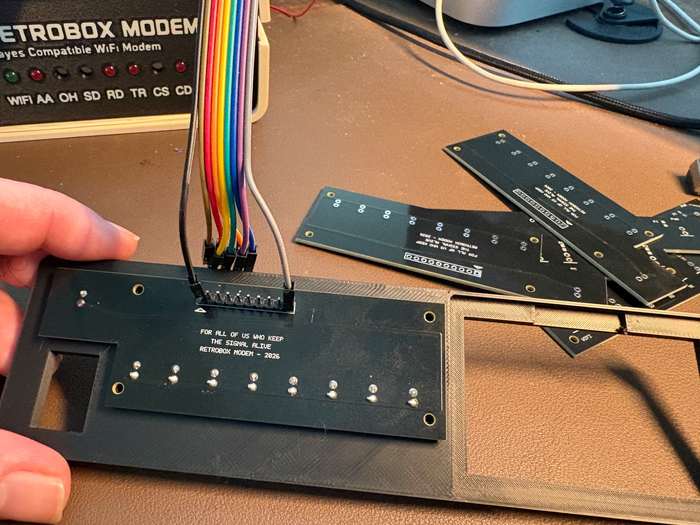
This is also why having the real board matters so much. A front panel can look correct in Tinkercad and a PCB can look correct on screen, but the useful test begins when both pieces are physically in the same place.
The latest prints are being checked against the board for LED height, hole position and the distance between the PCB and the front surface. These are small measurements, but they determine whether the finished panel looks deliberate or like a collection of parts that happened to fit.
A small easter egg on the back
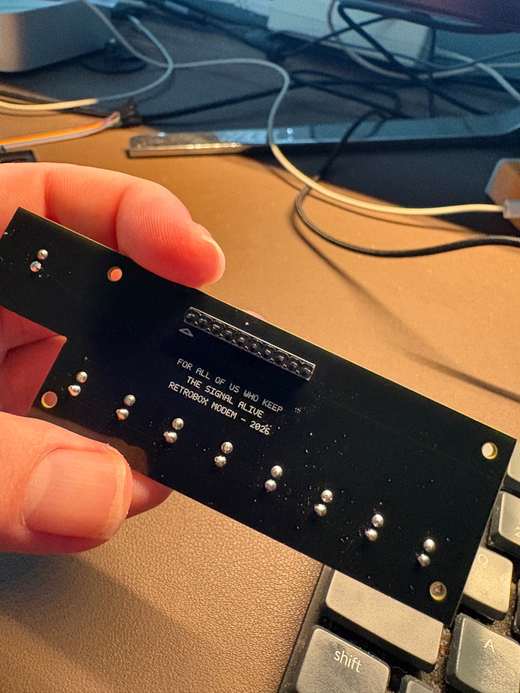
There is also something on the PCB that will normally disappear once the modem is assembled.
On the back I added the line “FOR ALL OF US WHO KEEP THE SIGNAL ALIVE”, followed by “RETROBOX MODEM – 2026”.
It does not change anything electrically and most of the time nobody will see it. That is precisely why I like it there. It is a small easter egg for anyone who eventually opens the case and looks closely at the board.
What comes next
Now that the boards are physically here, the next job is to finish validating the complete harness inside the enclosure and test every indicator with the PCB mounted in its final position.
The five core LEDs already have known behaviour in the firmware. The next useful step is to bring AA, OH, TR and CS through the same real-hardware validation before treating the whole front panel as finished.
It is still a small part of the modem, but seeing the LEDs move from loose prototype wiring to a board made specifically for RetroBox Modem makes the front of the machine feel considerably closer to the device I originally had in mind.
Follow the next hardware tests
The next posts will continue documenting the enclosure, electronics, firmware and real BBS tests as the prototype evolves.
Get updates →